knowledge-base
2025 DO 288 Red Hat OpenShift Developer II: Building and Deploying Cloud-native Applications
- 2025 DO 288 Red Hat OpenShift Developer II: Building and Deploying Cloud-native Applications
- DO288
- Basics
- Setup
- Red Hat OpenShift Concepts and Terminology
- Deployments
- Chapter 3. Building and Publishing Container Images
- Chapter 4. Managing Red Hat OpenShift Builds
- Chapter 5. Managing Red Hat OpenShift Deployments
- Chapter 6. Deploying Multi-container Applications
TOC created using the yzhang.markdown-all-in-one VS Code extension
Setup
crc setup
crc start
crc delete
oc login -u developer -p developer https://api.ocp4.example.com:6443
oc whoami --show-console
DO288
https://role.rhu.redhat.com/rol-rhu/app/courses/do288-4.14/
Basics
 etcd key value store
quay.io container registry
kubelet: on each cluster machine - ensure containers up & running
CRI-O: run, stop, restart containers implementing Kubernetes Container Runtime Interface (CRI)
etcd key value store
quay.io container registry
kubelet: on each cluster machine - ensure containers up & running
CRI-O: run, stop, restart containers implementing Kubernetes Container Runtime Interface (CRI)
Links
- Kubernetes Components
- Understanding Kubernetes objects
- Kubernetes Controllers
- Kubernetes Custom Resources
- CRI-O
- Open Container Initiative
Setup
OC 4.12
- https://console.redhat.com/openshift/create/local
- https://access.redhat.com/products/red-hat-openshift-container-platform
- https://odo.dev/
https://crc.dev/docs/introducing/
crc setup
crc start
crc delete
oc login -u developer -p developer https://api.ocp4.example.com:6443
oc whoami --show-console
Red Hat OpenShift Concepts and Terminology
GitOps Operator
oc api-resources | less
oc explain pvc
oc get projects
oc get all -n openshift-authentication
Deployments
oc new-app -i mysql \
	-e MYSQL_USER=user -e MYSQL_PASSWORD=pass \
	-e MYSQL_DATABASE=testdb -l db=mysql

oc new-app \
	--name hello -i php \ #use an image stream
	--code http://gitserver.example.com/mygitrepo.git

oc delete all --selector app=test

oc new-app \
	-o yaml registry.example.com/mycontainerimage

oc new-app -e DB_PASSWORD=test --name=todo-list \
	registry.ocp4.example.com:8443/redhattraining/openshift-dev-deploy-review-todo-list

oc delete all -l app=todo-list
odo
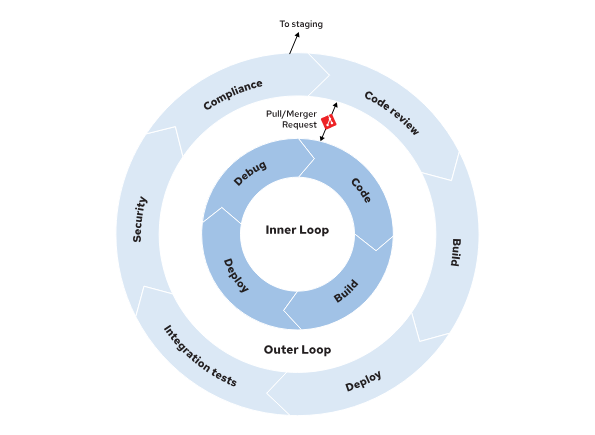
odo create project ...
odo deploy

odo preference set ImageRegistry REGISTRY_URL/NAMESPACE

oc expose service SERVICE_NAME
devfile example
schemaVersion: 2.2.0
metadata:
  name: nodejs
  version: 2.1.1
  displayName: Node.js Runtime
  description: Stack with Node.js 16
  tags: ["Node.js", "Express", "ubi8"]
  projectType: "Node.js"
  language: "JavaScript"
  provider: Red Hat
  supportUrl: https://github.com/devfile-samples/devfile-support#support-information
parent:
  id: nodejs
  registryUrl: "https://registry.devfile.io"
components:
  - name: image-build
    image:
      imageName: nodejs-image:latest
      dockerfile:
        uri: Dockerfile
        buildContext: .
        rootRequired: false
  - name: kubernetes-deploy
    kubernetes:
      uri: deploy.yaml
commands:
  - id: build-image
    apply:
      component: image-build
  - id: deployk8s
    apply:
      component: kubernetes-deploy
  - id: deploy
    composite:
      commands:
        - build-image
        - deployk8s
      group:
        kind: deploy
        isDefault: true
Links
Chapter 3. Building and Publishing Container Images
Use Red Hat Universal Base Images / UBI
find list here: https://catalog.redhat.com/search?searchType=containers
Support for non-root-users:
USER root
RUN chgrp -R 0 /var/cache && \
    chmod -R g=u /var/cache
USER 1001
Graceful shutdown
#!/bin/env bash

function graceful_shutdown() {
  kill -SIGTERM "$java_pid"
  wait "$java_pid"
  exit 0
}

# Trap the SIGTERM signal
trap graceful_shutdown SIGTERM

_...script omitted..._

# Start the application
java -jar example.jar &
java_pid=$!

_...script omitted..._

# Wait for the process to finish
wait "$java_pid"
pre-stop hook
apiVersion: v1
kind: Pod
metadata:
  name: example-pod
spec:
  containers:
    - name: my-container
      image: example.com/myimage
      lifecycle:
        preStop:
          httpGet:
            path: /shutdown
            port: 8080
maybe add labels with the io.openshift or io.k8s prefixes
LABEL io.openshift.min-cpu 2
use / define
- working directories
- environment variables for stuff that might change, e.g. directories, version numbers etc.
- declared volumes
- exposed ports
Links
- Red Hat Universal Base Images (UBI)
- Universal Base Images FAQ
- Red Hat Ecosystem Catalog - Certified container images
- Container Lifecycle Hooks
- Termination of Pods
Using External Registries in Red Hat OpenShift
3 Red Hat registries:
- registry.redhat.io (supported, requires authentication, browse with catalog.redhat.com/software/containers/explore)
- registry.access.redhat.com (supported, browse with catalog.redhat.com/software/containers/explore)
- quay.io
Get pull secret: https://console.redhat.com/openshift/install/pull-secret
Create image pull secret …
oc create secret docker-registry SECRET_NAME \
	--docker-server REGISTRY_URL \
	--docker-username USER \
	--docker-password PASSWORD \
	--docker-email=EMAIL

# or

oc create secret generic SECRET_NAME \
	--from-file .dockerconfigjson=${XDG_RUNTIME_DIR}/containers/auth.json \
	--type kubernetes.io/dockerconfigjson
… and then use it in manifest …
spec:
  containers:
  - name: example-container
    image: REGISTRY_URL
  imagePullSecrets:
  - name: SECRET_NAME
… or link it to a service account
oc secrets link --for=pull default SECRET_NAME

# unlink:
oc secrets unlink default wrong-registry-credentials
side note on how to access event log:
oc get event --field-selector type=Warning --sort-by='.lastTimestamp'
Creating Image Streams
oc describe is php -n openshift

# periodic updates, :tag is optional
oc import-image myimagestream --confirm --scheduled=true \
	--from example.com/example-repo/my-app-image:latest

# all tags
oc import-image myimagestream --confirm --all \
	--from registry/myorg/myimage

oc tag myimagestream:tag myimagestream:latest

oc create secret generic regtoken \
	--from-file .dockerconfigjson=${XDG_RUNTIME_DIR}/containers/auth.json \
	--type kubernetes.io/dockerconfigjson
oc import-image myimagestream --confirm \
	--from registry.example.com/myorg/myimage

oc get istag # oc get ImageStreamTag
use with kubernetes ressources
oc set image-lookup myimagestream
skopeo: Various operations with container images and container image registries
skopeo login registry.ocp4.example.com:8443 \
-u developer -p developer
skopeo inspect \
docker://registry.ocp4.example.com:8443/redhattraining/hello-world-nginx
Chapter 4. Managing Red Hat OpenShift Builds
build strategy
- Source / Source-to-Image (S2I) build (
sourceStrategy) - Docker build (
dockerStrategy) - Custom build (
customStrategy) - Pipeline build (
jenkinsPipelineStrategy)
builder image is automatically detected for S2I builds and contains amongst others
- assemble script
- run script
The build input sources, in order of precedence are: Dockerfile, Git, Image, Binary, Input Secrets, and External artifacts.
build config (bc) - example for S2I builds
kind: BuildConfig
apiVersion: build.openshift.io/v1
metadata:
  name: "php-sample-build"
spec:
  runPolicy: "Serial"
  triggers:
    - type: "ImageChange"
  source:
    git:
      uri: "http://services.lab.example.com/php-helloworld"
  strategy:
    sourceStrategy:
      from:
        kind: "ImageStreamTag"
        name: "ruby-20-centos7:latest"
  output:
    to:
      kind: "ImageStreamTag"
      name: "origin-ruby-sample:latest"
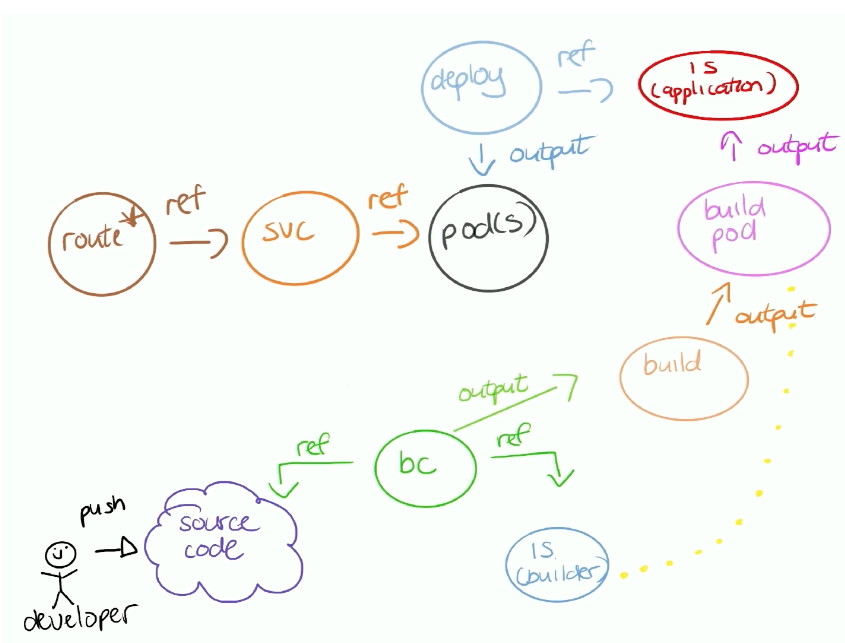
oc new-app -i php:7.3 --name=php-helloworld \
 --context-dir=php-helloworld https://github.com/RedHatTraining/DO288-apps
secrets & config maps
S2I build
...
source:
  git:
    uri: "http://services.lab.example.com/java-helloworld"
  configMaps:
    - configMap:
        name: settings-mvn
      destinationDir: ".m2"
  secrets:
    - secret:
        name: secret-mvn
      destinationDir: ".ssh"
Docker strategy
...
source:
  git:
    uri: "http://services.lab.example.com/java-helloworld"
  configMaps:
    - configMap: 1
        name: settings-mvn
      destinationDir: ".m2"
  secrets:
    - secret: 2
        name: secret-mvn
      destinationDir: ".ssh"
you can include custom assemble & run scripts for s2i
Managing Application Builds
oc new-app --name java-application \
	--build-env BUILD_ENV=BUILD_VALUE \
	--env RUNTIME_ENV=RUNTIME_VALUE \
	-i redhat-openjdk18-openshift:1.8 \
	--context-dir java-application \
	https://git.example.com/example/java-application-repository

oc new-app --name java-application \
	--strategy Docker \
	--context-dir java-application \
	https://git.example.com/example/java-application-repository
oc get builds

oc start-build buildconfig/app
oc start-build --follow vertx-site

oc cancel-build buildconfig/app
oc cancel-build app-build-3

oc wait --for=condition=complete \
	--timeout=600s builds/vertx-site-2
oc set env buildconfig/app BUILD_LOGLEVEL="3"

oc logs -f build/app-1
oc logs -f buildconfig/app

oc debug deploy/app
Triggering Builds
oc set triggers bc/name --from-image=project/image:tag
oc set triggers bc/name --from-image=project/image:tag --remove

oc set trigger deployment/name

oc set triggers bc/name --from-gitlab

oc create secret generic gitlab \
	--from-literal=username=developer --from-literal=password=d3v3lop3r
oc new-app --name builds-triggers \
	--source-secret gitlab $IMAGE~$GIT_REPO

oc rsh svc/builds-triggers \
	cat /etc/redhat-release
Customizing an Existing S2I Base Image
/usr/libexec/s2i/assemble/usr/libexec/s2i/run/usr/libexec/s2i/usage
c new-app --name bonjour \
	--context-dir labs/builds-s2i/s2i-scripts \
	httpd:2.4-ubi9~https://git.ocp4.example.com/developer/DO288-apps
what exactly does the resulting app image look like? -> unfortunately, it also contains the assemble script:
sh-5.1$ ls -la ./usr/libexec/s2i/
total 12
drwxr-xr-x. 2 root root  46 Feb 29  2024 .
drwxr-xr-x. 1 root root 151 Feb 29  2024 ..
-rwxrwxr-x. 1 root root 449 Feb 29  2024 assemble
-rwxrwxr-x. 1 root root 108 Feb 29  2024 run
-rwxrwxr-x. 1 root root 533 Feb 29  2024 usage
does it also contain the build artifacts? -> Perplexity Ai says usually not for compiled languages, but for interpreted languages it can be the case as the build container might be reused as app image. See https://www.perplexity.ai/search/does-an-application-image-buil-9BUxs_GdStyccN_Cy7jESg
Chapter 5. Managing Red Hat OpenShift Deployments
Deployment YAML
apiVersion: apps/v1
kind: Deployment
metadata:
  name: hello-openshift
spec:
  selector:
    matchLabels:
      app: hello-openshift
  replicas: 3
  strategy:
    type: RollingUpdate
    rollingUpdate:
      maxSurge: 1
      maxUnavailable: 1
  template:
    ...output omitted...
DeploymentConfig is deprecated: https://access.redhat.com/articles/7041372
Deployment Strategies with Deployment Resources:
- Rolling
- Recreate
- Custom (-> custom container image for deployment behaviour)
Deployment Strategies with the Red Hat OpenShift Router:
- Blue-Green Deployment
- A/B Deployment
oc new-app --as-deployment-config \
	--name users-db \
	-e MYSQL_USER=developer -e MYSQL_PASSWORD=redhat -e MYSQL_DATABASE=users \
	https://git.ocp4.example.com/developer/DO288-apps \
	--context-dir=apps/deployments-strategy/users-db \
	-o yaml > application.yaml
oc apply -f application.yaml

oc rollout latest dc/users-db
Links
- https://access.redhat.com/documentation/en-us/openshift_container_platform/4.14/html-single/building_applications/index#route-based-deployment-strategies
- An introduction to Blue-Green, canary, and rolling deployments
Managing Application Deployments
oc rollout status deployment example-deployment
oc rollout undo deployment example-deployment
oc rollout pause deployment example-deployment
oc rollout resume deployment example-deployment
oc scale deployment example-deployment --replicas=3
Secrets and Configuration Maps
Secret Types:
service-account-tokenbasic-authssh-authdockercfgtlsopaque
oc create configmap example-cm \
	--from-literal key1=value1 \
	--from-literal key2=value2

oc create configmap example-cm \
	--from-file=redis.conf

oc create configmap example-cm \
	--from-file=primary=/etc/redis/redis.conf \
	--from-file=replica=replica-redis.conf

oc get secret mysecret -o yaml

oc edit configmap my-cm

oc patch configmap/my-cm \
	--patch '{"data":{"key1":"newvalue1"}}'

oc extract secret/my-secret --to=/tmp/secret

oc extract secret/postgresql --to=.
tail -n +1 database*; echo

oc set data secret/my-secret --from-file=/tmp/secret

oc set env deployment my-deployment \
	--from configmap/my-cm

oc set volume deployment my-deployment --add \
	-t secret -m /path/to/mount/volume \
	--name myvol --secret-name my-secret
Using Service Accounts
Service accounts provide identity for applications.
oc create serviceaccount my-sa
oc set serviceaccount \
	deployment nginx-deployment my-sa

# mounted in pods:
oc exec somepod -- \
	ls /var/run/secrets/kubernetes.io/serviceaccount
configure security context
apiVersion: apps/v1
kind: Deployment
metadata:
  name: example-deployment
spec:
  replicas: 1
  selector:
    matchLabels:
      app: example
  strategy: {}
  template:
    metadata:
      labels:
        app: example
    spec:
      containers:
      - command:
        - sleep
        - infinity
        image: registry.access.redhat.com/ubi8/ubi:8.0
        name: ubi
        securityContext:
          runAsNonRoot: true
          allowPrivilegeEscalation: false
          seccompProfile:
            type: RuntimeDefault
          capabilities:
            drop:
            - ALL
Links
- Secrets
- Sealed Secrets
- ConfigMaps
- Configure a Pod to Use a ConfigMap
- Security Contexts
- Configure a Security Context for a Pod or Container
- Pod Security Admission
Deploying Stateful Applications
Storage class
- cluster resource (setup by admin)
- associated with storage provider
Persistent volume
- cluster resource (setup by admin)
- points to “real” volume
apiVersion: v1
kind: PersistentVolume
metadata:
  name: data-volume
spec:
  capacity:
    storage: 5Gi
  volumeMode: Filesystem
  accessModes:
    - ReadWriteOnce
  persistentVolumeReclaimPolicy: Recycle
  storageClassName: fast
  nfs:
    path: /exports-ocp4/example
    server: 192.168.50.10
Persistent Volumen Claim (PVC)
- parameters
- storage class (default if not specified)
- size (integer + unit e.g. Gi)
- accessModes
- RWO
- RWX
- ROX
- point to persistent volume (mounted in fs)
apiVersion: v1
kind: PersistentVolumeClaim
metadata:
  name: postgres-pvc
spec:
  storageClassName: nfs-storage
  accessModes:
  - ReadWriteOnce
  resources:
    requests:
      storage: 1Gi
  volumeMode: Filesystem
Mount PVC in pod
apiVersion: v1
kind: Pod
metadata:
  name: app-pod
spec:
  containers:
    - name: app-ui
      image: quay.io/example/nginx
      volumeMounts:
      - mountPath: "/var/www/html"
        name: ui-volume
  volumes:
    - name: ui-volume
      persistentVolumeClaim:
        claimName: data-volume-claim
Adding Storage to Deployments
- one PVC for all instances!
oc set volumes dc/postgresql \
	--add \
	--name nfs-volume-storage \
	--type pvc \
	--claim-mode rwo \
	--claim-size 1Gi \
	--mount-path /var/lib/pgsql/data \
	--claim-name postgres-pvc \
	--overwrite
apiVersion: apps/v1
kind: Deployment
metadata:
  name: my-deployment
  ...output omitted...
spec:
  ...output omitted...
  template:
    ...output omitted...
    spec:
      containers:
      - image: registry.ocp4.example.com:8443/rhel8/mysql-80
        ports:
        - containerPort: 3306
          protocol: TCP
        ...output omitted...
        volumeMounts:
        - mountPath: /tmp/data
          name: nfs-volume-storage
      ...output omitted...
      volumes:
      - name: nfs-volume-storage
        persistentVolumeClaim:
          claimName: my-data-claim
...output omitted...
Stateful Sets
- for stateful applications
- guaranteed to have a predictable ID for each pod
- dedicated PVC for each POD
- scaling up will create new empty PVCs, i.e. no contents are copied
- separate network name for each replica
apiVersion: apps/v1
kind: StatefulSet
metadata:
  name: my-stateful-app
spec:
  ...output omitted...
  replicas: 3
  serviceName: my-stateful-app
  template:
    ...output omitted...
    spec:
      containers:
        - image: my-app-image:latest
          name: mysql-80
          ports:
            - containerPort: 80
              protocol: TCP
          volumeMounts:
            - name: app-pvc
              mountPath: /var/lib/mysql
              subPath: mysql-db
      volumes:
        - name: init-db-volume
          configMap:
            name: init-db-cm
  volumeClaimTemplates:
    - metadata:
        name: app-pvc
      spec:
        accessModes: [ "ReadWriteOnce" ]
        storageClassName: nfs-storage
        resources:
          requests:
            storage: 1Gi
Links
Monitoring Application Health
Specifying Application Resource Requirements
apiVersion: apps/v1
kind: Deployment
metadata:
  name: example-deployment
spec:
  replicas: 1
  selector:
    matchLabels:
      deployment: example-deployment
  template:
    metadata:
      labels:
        deployment: example-deployment
    spec:
      containers:
      - image: quay.io/example/deployment:1.0
        name: example-deployment
        resources:
          requests:
            cpu: 100m
            memory: 200Mi
          limits:
            memory: 200Mi
Eviction strategy
| Category | Description | OpenShift Eviction Strategy |
|---|---|---|
| Best-Effort | Pods without requests and limits, which have an unpredictable resource consumption. | First pods to evict. |
| Burstable | Pods with requests, and no limits or limits that exceed the requests. | Pods to evict if there are no Best-effort pods left. |
| Guaranteed | Pods with equal requests and limits. | Never evicted. |
oc describe limitranges

oc get events \
	--sort-by=metadata.creationTimestamp --field-selector type=Warning
Red Hat OpenShift Application Health Checks
Probes
- startupProbe
- other probes not executed until successful
- restart on failure
- readinessProbe
- no more traffic if failing
- livenessProbe
- restart on failure
| Name | Mandatory | Description | Default Value |
|---|---|---|---|
initialDelaySeconds |
Yes | Determines how long to wait after the container starts before beginning the probe. | 0 |
timeoutSeconds |
Yes | Determines how long to wait for the probe to finish. If this time is exceeded, then OpenShift assumes that the probe failed. | 1 |
periodSeconds |
No | Specifies the frequency of the checks. | 1 |
successThreshold |
No | Specifies the minimum consecutive successes for the probe to be considered successful after it has failed. | 1 |
failureThreshold |
No | Specifies the minimum consecutive failures for the probe to be considered failed after it has succeeded. | 3 |
readinessProbe:
  httpGet:
    path: /health
    port: 8080
  initialDelaySeconds: 15
  timeoutSeconds: 1
livenessProbe:
  exec:
    command:
    - cat
    - /tmp/health
  initialDelaySeconds: 15
  timeoutSeconds: 1
livenessProbe:
  tcpSocket:
    port: 8080
  initialDelaySeconds: 15
  timeoutSeconds: 1
Creating Probes by Using the CLI
oc set probe deployment/myapp --readiness \
	--get-url=http://:8080/readyz --period-seconds=20

oc set probe deployment/myapp --liveness \
	--open-tcp=3306 --period-seconds=20 \
	--timeout-seconds=1
Links
- Kubernetes best practices: Resource requests and limits
- What everyone should know about Kubernetes memory limits, OOMKilled pods, and pizza parties
Chapter 6. Deploying Multi-container Applications
Red Hat OpenShift Templates
Access with ${MYPARAMETER}
- description: Myapp configuration data
  name: MYPARAMETER
  required: true
default
parameters:
- description: Myapp configuration data
  name: MYPARAMETER
  value: /etc/myapp/config.ini
generate default
parameters:
- description: ACME cloud provider API key
  name: APIKEY
  generate: expression
  from:"[a-zA-Z0-9]{12}"
oc new-app --file mytemplate.yaml -p PARAM1=value1 \
	-p PARAM2=value2

oc process -f mytemplate.yaml -p PARAM1=value1 \
	-p PARAM2=value2 > myresourcelist.json
oc create -f myresourcelist.json

oc process -f mytemplate.yaml -p PARAM1=value1 \
	-p PARAM2=value2 | oc create -f -

oc process -f mytemplate.yaml --parameters
can not be used as key for a label
Install Applications by Using Helm Charts
helm repo add openshift-helm-charts \
	https://charts.openshift.io/

helm search repo openshift-helm-charts

helm pull openshift-helm-charts/redhat-quarkus
helm pull openshift-helm-charts/redhat-quarkus \
	--untar --destination redhat-quarkus

helm package my-chart-directory

helm push example-chart-0.1.0.tgz example.repository.org

helm install my-quarkus-application \
	openshift-helm-charts/redhat-quarkus \
	--set replicaCount=3,image.tag=latest

helm install --wait expense-service .

helm upgrade my-quarkus-application \
	openshift-helm-charts/redhat-quarkus

helm ls

helm history my-quarkus-application

helm rollback my-quarkus-application 1

helm uninstall my-quarkus-application

helm create my-helm-chart
templating language
apiVersion: apps/v1
kind: Deployment
metadata:
  name: example-deployment
spec:
  replicas:
...deployment omitted...
variable scope
...
      - image:
        imagePullPolicy:
        name: example-deployment
control flow
      containers:
      - image:
      -
        env:
          - name: DATABASE_NAME
            valueFrom:
              secretKeyRef:
                key: database-name
                name: postgresql
...
example
...file omitted...
  database-user:


  database-password:

  database-password:
Template rendering - works as well for remote charts
# render all templates
helm template .

# render specific template
helm template -s templates/serviceaccount.yaml .

helm template \
	--skip-tests ./ > ../kustomized-quotes/base/app.yaml
Use templates/NOTES.txtfor message displayed after using the chart
Links
- Using Helm with Red Hat OpenShift
- IBM Helm Repositories
- Upstream Helm Repositories
- HashiCorp Helm Repositories
- Bitnami Helm repositories
- Ask the Product Manager Office Hours: Operators and Helm
-
[Helm Getting Started](https://helm.sh/docs/chart_template_guide/getting_started/) - Go Template Language
The Kustomize CLI
Templating Deployments with Kustomize
example layout
myapp
├── base
└── overlays
  ├── production
  └── staging
kustomization.yaml file for each configuration set
resources:
- deployment.yaml
- secrets.yaml
- service.yaml
overlay example
resources:
- ../../base
patches:
- path: replica_limits.yaml
oc kustomize ./base
oc apply -k overlays/stage
Links
- Kustomize - Kubernetes native configuration management
- Kubernetes Object Management
- Kustomize Examples
- Kustomize Builtin Transformers
Red Hat OpenShift Pipelines Architecture and Components
The foundation of OpenShift Pipelines is Tekton To enable the CI/CD capabilities in OpenShift, install the Red Hat OpenShift Pipelines operator from the Operator Hub.
- Pipeline
- task
- step
- task
- Workspace: storage
- e.g. share state between steps / tasks
- triggers
- Trigger
- TriggerBinding
- TriggerTemplate
Reusable tasks available at https://hub.tekton.dev/
tkn CLI - tekton
Links
Creating CI/CD Workflows by Using Red Hat OpenShift Pipelines
Custom tasks (namespace/project scope)
---
apiVersion: tekton.dev/v1
kind: Task
metadata:
  name: fetch-url
spec:
  results:
    - name: output
  params:
    - name: URL
      description: The URL to fetch.
      type: string
  steps:
    - name: curl-run
      image: example.com/example/image:latest
      script: |
        curl $(params.URL) | tee $(results.output.path)
Cluster tasks
- cluster scope
- now deprecated, replaced by resolvers
---
apiVersion: tekton.dev/v1
kind: TaskRun
metadata:
  name: fetch-app
spec:
  taskRef:
    kind: ClusterTask
    name: git-clone
  params:
    - name: url
      value: https://git.example.com/app
    - name: revision
      value: main
    - name: subdirectory
      value: ""
Pipeline definition
---
apiVersion: tekton.dev/v1
kind: Pipeline
metadata:
  name: my-pipeline
spec:
  params:
    - name: GIT_REPO
      type: string
      default: "example.com/app/repo"
  workspaces:
    - name: app-build

  tasks:
    - name: fetch-repository
      taskRef:
        name: git-clone
        kind: ClusterTask
      params:
        - name: url
          value: $(params.GIT_REPO)
      workspaces:
        - name: output
          workspace: app-build

    - name: run-lint
      taskRef:
        name: linter
        kind: Task
      params:
        - name: DIRECTORY
          value: "path/to/code"
      workspaces:
        - name: source
          workspace: app-build
      runAfter:
        - fetch-repository
PipelineRun
---
apiVersion: tekton.dev/v1
kind: PipelineRun
metadata:
  name: fetch-pipeline
spec:
  pipelineRef:
    name: my-pipeline
  params:
    - name: GIT_REPO
      value: https://example.com/app/repo
Tekton
# Task
tkn t list
tkn t describe fetch-url
tkn t start fetch-url

# ClusterTask (deprecated)
tkn ct list
tkn ct describe openshift-client

# Pipeline
tkn p describe my-pipeline
tkn p start my-pipeline
tkn p start my-pipeline \
	-w name=app-build,volumeClaimTemplateFile=pvc-template.yaml

# Pipeline Run
tkn pr list
tkn pr logs my-pipeline-1