knowledge-base
AWS Certified Developer Associate
- https://www.udemy.com/course/aws-certified-developer-associate-dva-c01/
- https://stephanemaarek.com/
- https://aws.amazon.com/de/certification/certification-prep/
- Slides & Code: https://drive.google.com/open?id=17XcwcDiU_Twynr3zq0iR_Sp6zA7TjEcf
Regions
Regions - Availability Zone ~data center https://aws.amazon.com/de/about-aws/global-infrastructure/
IAM
- user - group - role (machine)
- SAML Standard (Active directory) https://de.wikipedia.org/wiki/Security_Assertion_Markup_Language
- Security Group: Region Scoped
EC2
-
SSH Connect to EC2 Instance
ssh -i ~/config/aws/TimsEC2InstanceKeys.pem ec2-user@3.122.55.45=> Connect => SSH Client
- Security Group <=> Firewall
- Elastic IP: Fixed IP for EC2 instances
- On Demand: Elastic workload
-
Dedicated Host vs Dedicated Instance?
-
ENI: Elastic Network Interface
https://aws.amazon.com/blogs/aws/new-elastic-network-interfaces-in-the-virtual-private-cloud/
- EC2 Pricing https://aws.amazon.com/ec2/pricing/on-demand/
- EC2 Instances: https://ec2instances.info/
- AMI: Amazon Machine Image
-
User Data (provisioning script) example:
#!/bin/bash yum update -y yum install -y httpd.x86_64 systemctl start httpd.service systemctl enable httpd.service echo "Hello World from $(hostname -f)" > /var/www/html/index.html - EBS Elastic Block Store
- Easy backup
-
Linux Befehle:
lsblk -
https://docs.aws.amazon.com/AWSEC2/latest/UserGuide/ebs-using-volumes.html
- GP2 Volume
- General Purpose
- 1Gb - 16 TB
- Burst to 3000 (for small)
- IOPS depend on Volume (3 IOPS per GB, max 16000)
- IO1
- high IOPS requirement, e.g. DB
- 4 GB - 16 TB
- PIOPS: 100 - 32k (64k for nitro)
- Max PIOPS : GB => 50:1
- ST1
- Streaming Workloads, fast throughput, low price
- DWH, Kafka etc
- 40MB/s per TB, Max 500MB/s
- SC1
- throught oriented, less frequently accessed
- cheaper than ST1
- 12MB/s per TB, Max 250MB/s
- Local EC2 Instance Store
- physical disk attached to machine
- high IOPS
EFS
- Elastic File System
- Manages NFS, multi-AZ
- HA, Scalable, Expensive, Pay Per Use
- Linux only
- Performance Mode
- GP (low latency)
- Max I/O
- Tiers
- Standard
- EFS-IA: infrequent access, lower price but restore fee
- https://docs.aws.amazon.com/efs/latest/ug/mounting-fs.html
RDS
- Relational Database Service
- Postgres
- MaySQL
- MariaDB
- Oracle
- Microsoft SQL Developer
- Aurora
- Backups:
- Daily
- Transaction logs @ 5 min
- up to 35 days
- Manual Snapshots
Read Replicas & Multi AZ
- Read Replicas
- up to 5
- within AZ, Cross AZ, Cross Region
- ASYNC, eventually consistent
- desired instances in connection String
- can be promoted to own DB
- Network cost: data exchange between AZs
- Can be setup to multi AZ for desaster recovery
- Multi AZ
- SYNC replication
- One DNS + failover
- Encryption
- at rest encryption
- master must be encrypted for read replica encryption
- in-flight encryption (SSL)
- Postgres: parameter group: rds.force_ssl=1
- MySQL: Within the DB: GRANT USAGE ON . TO ‘mysqluser’@’%’ REQUIRE SSL;
- encrypt unencrypted DB
- create Snapshot
- copy & encrypt snapshot
- restore to new encrypted DB from encrypted snapshot
- Postgres does not provide TDE
- at rest encryption
- Access Management: Login:
- usname / password
- IAM for MySQL, Postgres Aurora
Aurora
- performance boost: 5x MySql, 3x Postgres
- 6 Instances
- 3 AZ
- 1 Master
- 5 Read Replicas
- failover in less than 30 sec
- requirements:
- writes: 4 / 6
- reads: 3 / 6
- enpoints
- writer
- reader
- connection LB
- Aurora
- Serverless
- Cross Region (?)
- Global
- select global reader / writer endpoint for access
AWS ElastiCache
- Redis
- memcached
- write / read scaling
- multi-AZ
- caching Pattern
- Lazy Loading / Cache-Aside / Lazy Population
Route 53
- A: hostname => IPv4
- AAAA: hostname => IPv6
- CNAME: hostname to hostname
- Alias: hostname to AWS resource
- nslookup / dig
-
TTL: konfigurierbar in Route53
- Routing Policies:
- simple
- weighted
- latency
- Failover
- Geo Location
- health checks
- unhealthy after X checks failed (default 3)
- heathy after X checks apssed (default 3)
- Default Interval 30s (up to 10s for more $)
- ~15 health checkers running in parrallel
VPC
- only in 1 regions
- Subnets
- Tied to AZ (one? really!?)
- private
- public
- CIDR https://en.wikipedia.org/wiki/Classless_Inter-Domain_Routing
- default VPC: only 1 public subnet
- Internet gateway (internet access VPC)
- NAT-Gateway / NAT-Instances
- deployed in public subnet
- acces to internet from private subnet
- NACL
- Network Access Control List
- Firewall in/out traffic subnet
- VPC Flow Logs!
- can be sent to S3 / Cloud Watch
- VPC peering
- IP ranges should not overlap!
- not transitive!
- VPC Endpoints (Gateway/Interface)
- private access to AWS services
- Site to Site VPN vs Direct Connect
S3
- Buckets are defined at the region level
-
5GB => multipart uploads
- Versioning possible
- S3 Encryption
- SSE-S3: AWS Keys (AES-256)
- Header “x-amz-server-side-encryption”: “AES256”
- SSE-KMS: KMS Keys
- key access control & audit
- Header “x-amz-server-side-encryption”: “aws:kms”
- uses KMS Customer Master KEy (CMK)
- SSE-C: Own Keys
- Amazon does not store keys
- https must be used
- encryption key in header
- Client-Side Encryption
- eg amazon S3 encryption client
- SSE-S3: AWS Keys (AES-256)
- S3 Security
- User based / IAM
- Resource Based:
- Bucket Policies
- Object ACL - finer grain (not relevant)
- Bucket ACL - less common (not relevant)
CLI & Stuff
aws configure
~/.aws/config
~/.aws/credentials
- Generator: https://awspolicygen.s3.amazonaws.com/policygen.html
- Simulator: https://policysim.aws.amazon.com/
-
Test if command would succeed
--dry-run - STS: Security Token Service (temporary, limited-priviledge credentials)
- decode authorization message https://docs.aws.amazon.com/cli/latest/reference/sts/decode-authorization-message.html
-
sts get-session-token for MFA
aws sts decode-authorization-message …
- AWS EC2 Instance Metadata http://169.254.169.254/latest/meta-data
- AWS Limits
- API Rate limits
- Service Quotas
- exponential backoff!
- Credentials Provider Chain
- CLI
- CMD Opts
- Env variables
- ~/.aws/credentials
- ~/.aws/config
- Container Credentials
- Instance Profile credentials
- SDK
- Env Variables
- Java System Properties
- ~/.aws/credentials
- Container Credentials
- Instance Profile credentials
- CLI
- Credentials Best practices
- never in code!
- in AWS: Roles
- outside: env variables / named profiles
- SigV4
- sign request to AWS for authentication
- HTTP Header or Query String
Advanced S3 & Athena
- enable MFA Delete (for permanent delete of object)
- enable through cli
- with root account!
- S3 Access Logs
- Logging Bucket
- never monitor the logging bucket
- => logging loop / expotential loop
- AWS Console: Enable Server Access Logging
- Acl updated automatically
- Analyse with Anthena
- never monitor the logging bucket
- Logging Bucket
- S3 Replication
- CRR (Cross Region Replication)
- e.g. lower latency access
- desaster recovery
- or replication across accounts
- SRR (Same Region Replication)
- e.g. log aggregation
- or live replication prod => test
- IAM has to be setup
- Only new objects are replicated
- deletes markers are by default not replicated (but can be!)
- permanent deletes are never replrecated
- not transitive
- AWS Console: Management => create replication rule
- replication including version ID
- pre-signed URLs
- SDK or CLI
- default 3600 seconds (–expires-in)
- permissions inherited from issuing user
aws s3 presign s3://mybucket/myobject --region my-region
- Storage Classes
- S3 Standard
- Sustain 2 concurrenct facility failures
- Standard-Stuff
- IA
- 128kb min charge / object
- 30 days min
- Retrieval fee / GB
- S3 Standard-IA (Infrequent Access)
- Rapid Access when needed
- Less Available Lower Cost
- for: Desaster recovery, backups
- S3 One Zone-IA
- Single AZ
- Less Available Lower Cost then Standard-IA
- for: secondary data backups, recreatable data
- S3 Intelligent Tiering
- 30 days min
- fee for auto-tiering
- aut. moves objects between 2 access tiers
- Resilient against single-AZ events
- Glacier
- archive
- low cost
- retained > 10 years, min. 90 days
- Retrieval fee / GB
- 40 kb min charge / object
- each archive (file) up to 40 GB
- archives are stored in vaults
- Retrieval Options
- Expedited 1-5 minutes
- Standard 3-5 hours
- Bulk 5-12 hours
- Glacier Deep Archive
- Retrieval Options
- Standard 12 hours
- Bulk 48 hours
- min. 180 days
- Retrieval Options
- S3 Reduced Redundancy Storege (deprecated)
- S3 Standard
- Licecycle rules
- move to other storage class (transitions actions) / delete (expiration action) after a while
- can be configured for certain prefix
- S3 limitations per prefix
- KMS Limits per Key
- S3 Byte-Range fetches can be used to optimize performance
- S3 Select & Glacier Select
- SQL filtering for rows & columns
- e.g. CSV filtering
- SQL filtering for rows & columns
- S3 Event Notifications
- Select by event type and object name
- targets: SNS, SQS, Lambda Functions
- Athena
- Serverkess service to perform analytics against S3
- via SQL / JDBC / ODBC
- CSV, JSON etc
- BI / Analytics / Reporting
- S3 Oject Lock & Glacier Vault Lock
- CRR (Cross Region Replication)
AWS CloudFront
- CDN
- DDoS protection with Shield
- Origins:
- S3 Bucket (edge caching, Security: Origin Access Identity, ingress for uploas)
- Custom Origin (http)
- Blacklist / Whitelist per Country (3rd party IP database)
- CloudFront Signed URL / Cookies
- Expiration, IP Randes, Trusted signers (AWS Accounts)
- Validity:
- shared content => minutes
- private content => years?
- signed URL: individual files
- signed cookie: multiple files
ECS / ECR
- config file (via user data) to specify ECS cluster (/etc/ecs/ecs.config : ECS_CLUSTER)
- Use correct AMI!!
- Make Sure ECS agent is running
- ECS Task definition:
- JSON how to run docker image (Port bidning, image etc) => analog deployment.yml
- can have an IAM Role (/etc/ecs/ecs.config : ECS_ENABLE_TASK_IAM_ROLE)
- ECS Service (analog kubernetes deployment)
- ensures instance count
- ECS Load Balancer
- Dynamic Load Balancer
- ECR
- CLI v1: exectue output / env variables
- CLI v2: pipe password
- Fargate: Serverless Container Execution
- ECS IAM Deep Dive
- EC2 Instance Profile (Role!)
- used by ECS agent
- API calls to ECS service
- container logs => cloud watch
- ECS Task Role (per container)
- EC2 Instance Profile (Role!)
- ECS Auto Scaling
- Types
- Target Tracking
- Step Scaling
- Scheduled Scalind
- Cluster Capacity Providers
- nochmal genauer anschauen! => ausprobieren?
- Types
AWS Elastic Beanstalk
- Deploy applications
- Pay for only underlying Services
- Manages
- Instance config & OS
- Deployment strategy
- Arch models:
- Single Instance
- ELB + ASG
- ASG
- Components
- App
- App Version
- Env Name
- Promote & Rollback Versions
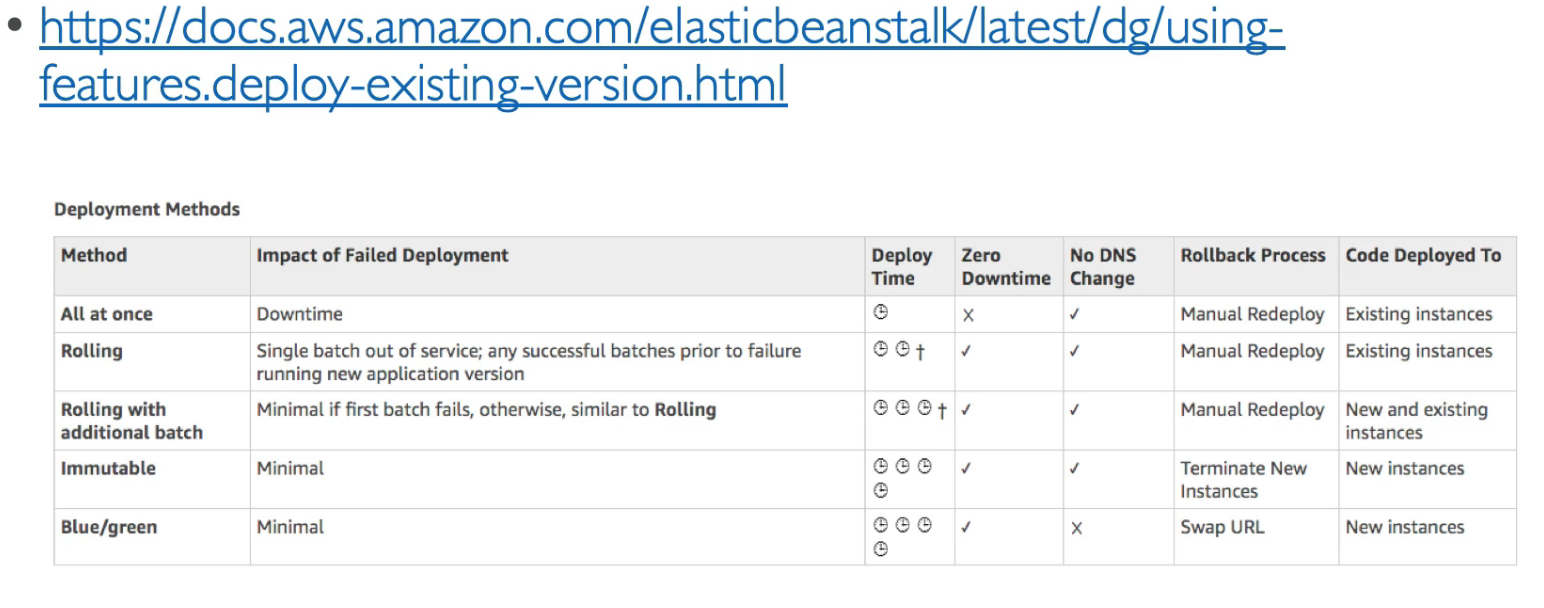
- Deployment Options
- All at once (fast, downtime)
- Rolling (with bucket size)
- Rolling with additional batches (with bucket size, extra cost)
- Imutable (new ASG, most cost, slow, easy rollback)
- blue/green via environments (more or less manual)